Login account, choose iTunes Connect, My Apps
Press + symbol on top left, choose
New iOS App from list.
Name your app, choose language, bundle
id from drop down menu . SKU use for yourself to distinguish your apps, this name not
show on store. Press Create.
On App information choose Category, Secondry can be ignore.
Save before continue.
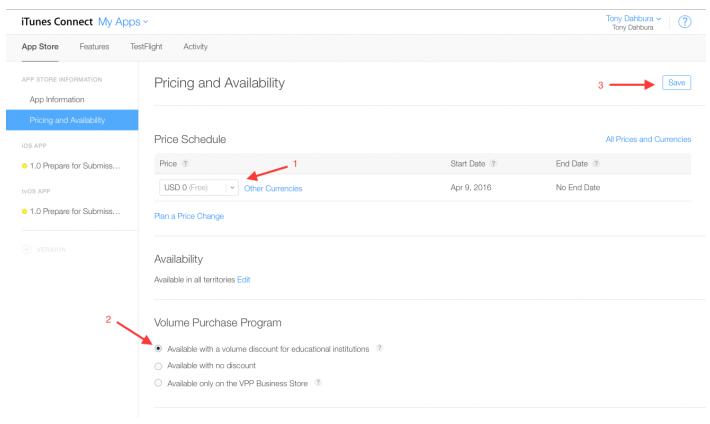
On price and availble choose price, sale or free. End Date choose No
End Date, Save.
Go to prepare for submit.
Click Choose file to upload
screenshot, now it require 5.5 and 12.9 inch.
Scroll to Description,
it should not longer than 400-500 words.
Keyword very important,
contain all text that you thing user can search to find app, don’t use space
bar, no need blank character, it use comma to separate words.
Website can use a simple
blog, for example, myapp.blogspot.com, post your app description on it.
Scroll to General App Information.
Click Choose file to upload icon 1024x1024, picture must have white
background, not transparent.
In copyright, you can
write Copyright (c) 2017 John Smith ,
this will show on Store.
Enter name, address, phone number.
Click to Edit near
Rating.
Check to all questions,
click Done.
Scroll to Build choose
uploaded file, Done.
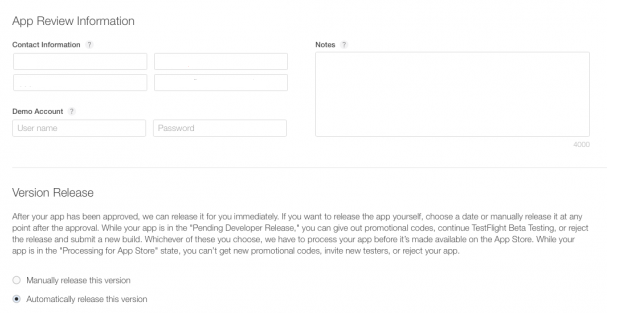
App review information, this is information for app checker.
Enter name, email, phone
number. If app need account to login, leave a Demo account there.
In note, you can write
something like This app is an individual
tool app, no special require!
Click Save.
Press Submit for review,
if has red error, check all items, fill it, Save again, Submit.
On pop up window, answer
questions exactly.
Advertising identifier click
Yes if has ads.
On pop up window, check
to Serve advertisements
within the app.
If use Facebook, check to second box.
Last, check to forth box, press Submit.
App status change to
waiting for review, when it show Ready for Sale, your app now live on Itune
Store.
Wait time can vary from 10 hours to several days.