Showing posts with label Swift in use. Show all posts

Friday, February 22, 2019

Swift play music online

We want to play music online, declare a variable to above viewDidLoad.
var player : AVPlayer!
Copy in to viewDidLoad.
let url =  "https://s3.amazonaws.com/kargopolov/kukushka.mp3"
let songUrl = NSURL(string: url)
var playerItem:AVPlayerItem?
do {

   playerItem = AVPlayerItem(URL: songUrl!)
player=AVPlayer(playerItem: playerItem!)
let playerLayer=AVPlayerLayer(player: player)
  playerLayer.frame=CGRectMake(0, 0, 300, 50)
self.view.layer.addSublayer(playerLayer)

player.play()

    } catch (let error asNSError) {
// print("audioPlayer error: \(error)")

    }

We use AVPlayer, not AVAudioPlayer
Add these lines in to file info.plist on left tree folder.
<key>NSAppTransportSecurity</key>
     <dict>
     <key>NSAllowsArbitraryLoads</key>
     <true/>
     </dict>
Right click mouse to open source and copy to.


Swift play music background

We have an app playing music, if not set play background mode, when screen turn off, music off too. Let add these lines in to viewDidLoad.
do {
tryAVAudioSession.sharedInstance().setCategory(AVAudioSessionCategoryPlayback)
//print("AVAudioSession Category Playback OK")
do {
tryAVAudioSession.sharedInstance().setActive(true)
// print("AVAudioSession is Active")
            } catchlet error asNSError {
print(error.localizedDescription)
            }
        } catchlet error asNSError {
print(error.localizedDescription)
        }
Click to top folder, choose Capabilities, find Backgroud modes, click to small triangle to show more, click to turn On and check to Audio, Airplay and Picture in Picture.


Thursday, February 21, 2019

Swift play video file

We can play video file with mov and mp4 format in Swift.
Drag video file in to project tree folder.
Import libraries..
import UIKit
import AVFoundation
import AVKit
Copy in to viewDidLoad.
let url = NSBundle.mainBundle().pathForResource("video", ofType: "mp4")!
let play = AVPlayer(URL: NSURL(fileURLWithPath: url))
let playerViewController = AVPlayerViewController()
 playerViewController.player = play
self.addChildViewController(playerViewController)
self.view.addSubview(playerViewController.view)
playerViewController.view.frame = self.view.frame
play.play()

Run to see this screen.

If don’t want play full screen, repalce line playerViewController.view.frame = self.view.frame
by playerViewController.view.frame =  CGRectMake(30,80,300,400)
Screen play now width 300dp and height 400dp.
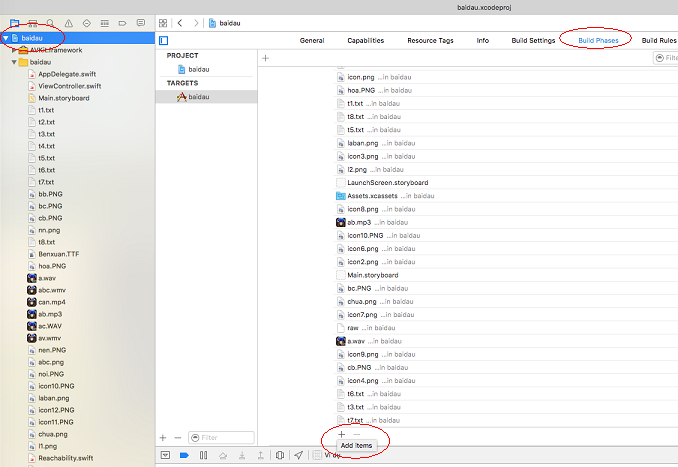
If app crash, check Bundle Resource.
Click top tree folder, choose Build Phases, extend Copy Bundle Resources by click to left triangle symbol, scroll down and Click + .

Choose video file, click Add.

If a file format not support, screen will look like this.